
Your company profile is what AI matching reads, so keeping it accurate is the most useful thing you can do in Tendly.
Where to find it
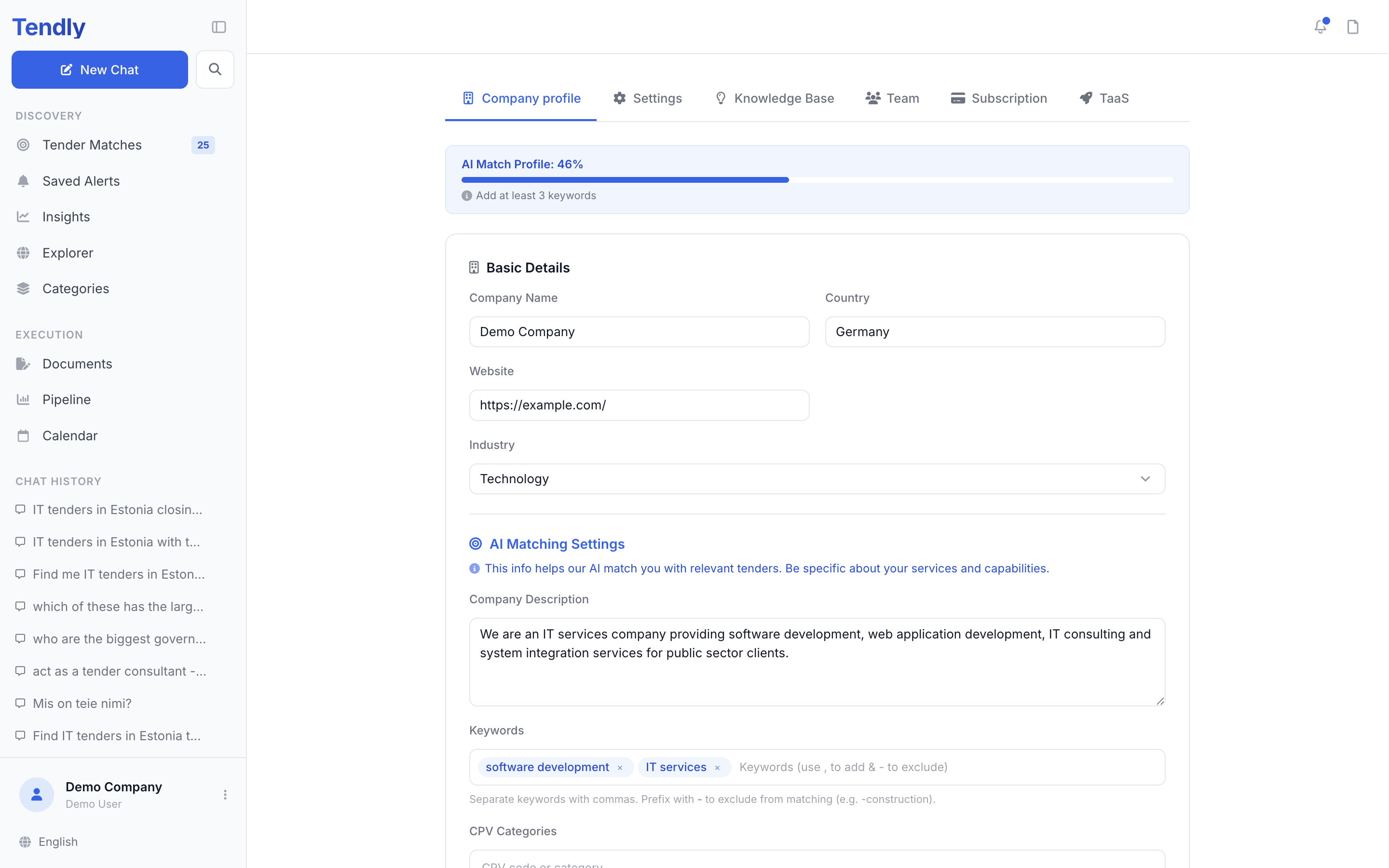
Click the button at the bottom of the left sidebar — it shows your company name and your name — then click "Company profile". The page opens on the "Company profile" tab, next to "Settings", "Knowledge Base", "Team", "Subscription" and "TaaS".
This profile belongs to the company, not to you personally. Everyone you invite sees and edits the same profile, and shares the matches it produces.
Basic Details
"Company Name", "Country", "Website" and "Industry". Your own name, phone number, preferred language, currency and notification settings live on the "Settings" tab instead.
AI Matching Settings
This is the section that changes which tenders reach you.
- "Company Description" — what you do, what you sell, what you specialise in.
- "Keywords" — separate them with commas, and prefix a word with a minus sign to exclude it (for example, -construction).
- "CPV Categories" — start typing a code or a category name and pick from the list; anything that is not a real CPV code is refused and the field flashes red instead of adding a chip.
- "Tender Preferences" — the contracts you want: sectors, sizes, evaluation types.
- "Service Areas" — tick the countries you serve. The country you chose at signup is already ticked.
- "Preferred Contract Value (Min)" and "Preferred Contract Value (Max)".
- "Max Acceptable Price Weight (%)" — 40 by default. It records how much of the evaluation score you are willing to see given to price; the field's hint says you will see a warning on tenders that go above it.
Below that, "Certifications & Qualifications" takes your ISO standards, clearances and licences. List them here as text; the certificate files themselves belong in your knowledge base. Finish with "Save Company Profile"; leaving the page with unsaved edits raises an "Unsaved changes" prompt.
Why keywords and CPV categories matter most
Matching takes the CPV categories and keywords from this page, narrows every open tender in your chosen countries down to those categories, then scores what is left on where your keywords appear in the title, description and category name. With neither a CPV category nor a keyword there is nothing to filter on, so matching stops and tells you: "AI matching needs at least one CPV code or keyword in your company profile."
Your description is not what that matcher reads. It is what the AI assistant uses to answer your questions, what the Documents workspace uses when it drafts a bid, and what a Tendly expert reads when reviewing tenders for you. So write the description for a human, and give the matcher keywords.
The "AI Match Profile" meter
The blue bar at the top of the page scores how complete the profile is and names the single change that would help most — "Add a 1–2 sentence company description", "Add at least 3 keywords", "Pick at least one CPV category", "Pick the countries you serve" or "Add your certifications". Once nothing is missing it reads "Profile is fully set up".
The score is weighted rather than a plain field count. Description, keywords and CPV categories carry the most; company name, service areas and tender preferences come next; industry, contract value, country, website and certifications add a few points each. A description only counts once it is about 40 characters long, and keywords only from three of them.
Editing this page does not re-score the matches you already have. Open "Tender Matches" and click "Change scope or re-run" to run matching again on the new profile.