
Look up any company that has won a public contract and see what it won, from which buyers, and where.
Find the company
- In the left sidebar, under "Discovery", click "Insights".
- Type the company name into the box at the bottom and send it.
- Results appear under "Matching companies" with a results counter.
- Read the card: a SELLER or BUYER chip, three figures — CONTRACTS, TOTAL VALUE, AVG VALUE — and up to three countries.
- Click "Analytics Overview" to open the analytics panel beside the chat.
Prefer a guided route? Click the sliders icon to the right of the message box to open the "Tools" menu and choose "Seller analysis". Tendly asks for the name, then offers chips for "Give an overview", "View all contracts" and "Strategy analytics".
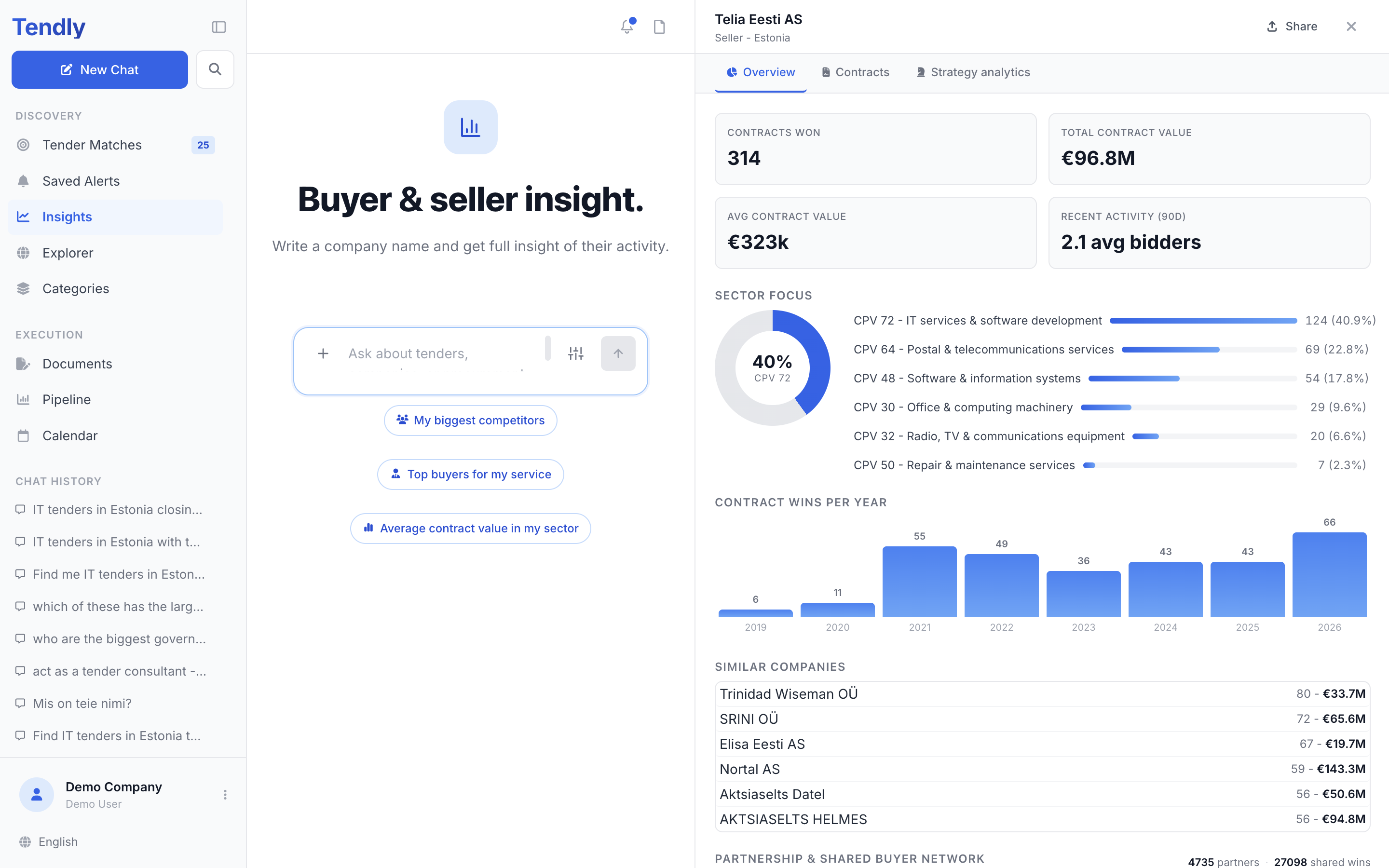
The Overview tab
- "Contracts won", "Total contract value", "Avg contract value" and "Recent activity (90d)"
- "Sector focus" — their six biggest CPV divisions
- "Contract wins per year" — up to their last eight years with wins
- "Similar companies" — up to six other winners in the same sectors and countries
- "Partnership & shared buyer network" — up to six companies that win from the same buyers, with the number of shared wins
- "Performance Analytics" — "Revenue Trends" (last 24 months), "Contract Categories", "CPV Categories", "Geographic coverage" and "Key authorities"
Hover a pie slice or a legend row for exact counts and percentages.
Contracts and Strategy analytics
"Contracts" lists their 15 most recent wins — title, buyer, value and date — under a "Showing 15 of ..." line, followed by "Contract characteristics": how many of their wins are "Green procurement", "E-procurement", "EU funded" or "Innovative aspects".
"Strategy analytics" answers two questions: which countries they win in ("Geographic coverage", top 10) and which buyers they win from ("Key authorities", top 8).
To keep digging, click "Ask AI about ..." at the bottom of the panel and ask in your own words. To send the profile to a colleague, click "Share" in the panel header, then "Copy link" — that link opens the same profile for anyone, with no account.
What the numbers are built from
Every figure comes from award notices Tendly collects from official procurement portals in 28 markets. That shapes what you can and cannot learn:
- There is no win rate anywhere in Insights. Portals publish who won, not everyone who bid, so wins can be counted and losses cannot.
- The search merges case, spacing and punctuation variants of a name into one card, but it cannot merge genuinely different spellings, so a company written differently across markets can still appear more than once — and the analytics panel counts only the exact spelling you opened.
- A search returns at most 20 companies.
- A company's analytics panel is cached for up to six hours (one hour for a name with no records), so an award published in the last few hours may not show yet.
- Open the panel for a name with no award history and it shows "We couldn't find any procurement records for ... yet."
The Insights page, the company cards and the whole analytics panel are free and work without an account. Only the chat message that runs the search costs credits, and only on the Free plan — see Plans and credits.