
Credits are what Free accounts spend on Tendly's AI; on a paid plan the same actions run without being charged.
Where your balance lives
Click your name at the bottom of the left sidebar. The profile menu opens with a coin icon, your balance and the word "Credits" at the top. The "+" button beside it ("Add credits") takes you to your subscription page, and the "Subscribe" button just below opens the plan picker.
What actually spends credits
Only two actions deduct credits today, and only for accounts on the Free plan:
- Sending a chat message — 3 credits, taken after the answer arrives. A turn that errors is never charged.
- Re-running tender matching yourself — 5 credits, taken only when the run finishes. A failed run is never charged.
Everything else costs nothing: reading tenders, opening a tender's documents, the whole Insights analytics panel, alerts, the pipeline and the calendar — though some areas are still plan-gated rather than credit-priced, such as the Documents workspace, which needs a paid plan.
On any paid plan, chat and matching are covered by the plan and no credits are deducted at all. A member of a paid team counts as paid, even if their own personal subscription still says Free.
Free plan, trials and limits
A new account gets 20 welcome credits, once. They do not renew each month, so when they run out you buy a pack, subscribe, or earn more through the "Earn Free Credits" referral link on your Subscription tab.
Separate from credits, chat has message limits: 25 messages in total without an account, 20 per day on Free, and no limit on a paid plan. Free accounts can also pick only one country when running matching — the country list in "Run new matching" shows radio buttons instead of checkboxes, with the hint "Free plan — select one country." and an "Upgrade to Pro to pick multiple countries" link.
All paid plans — Professional, Enterprise and Strategist — start with a 7-day free trial, and only for accounts that have never held a subscription. The plan's credits are granted at checkout, so they are yours to use during the trial.
Upgrading and topping up
Two pages do two different jobs.
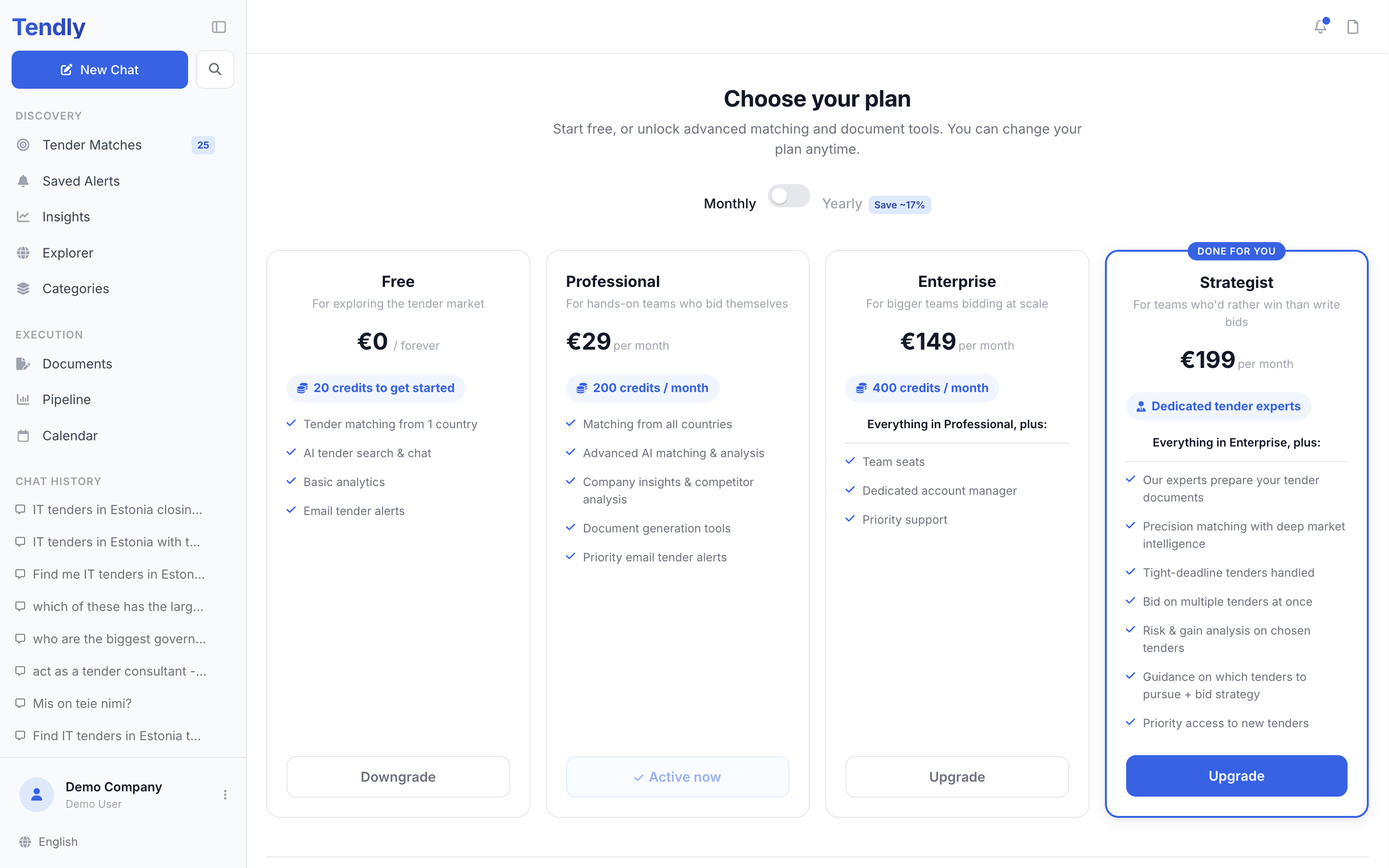
- The plan picker — reached from "Subscribe" in the profile menu. Compare Free, Professional, Enterprise and Strategist, switch between "Monthly" and "Yearly", and start a subscription. Your current tier shows a greyed-out "Active now"; on a Free account every paid tier shows "Start 7-day free trial", and once you are on a paid plan the tiers above say "Upgrade" and the ones below say "Downgrade".
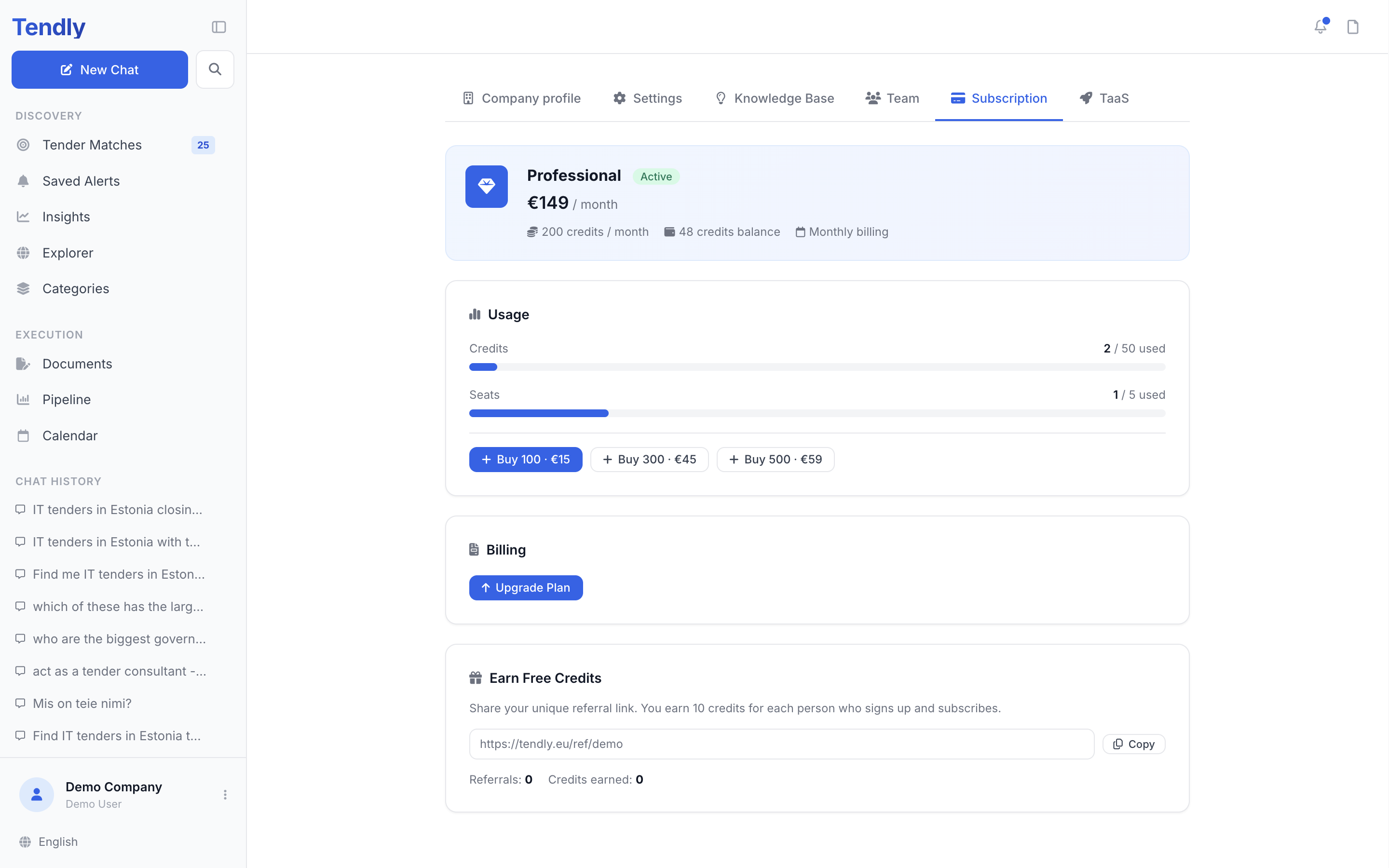
- The "Subscription" tab — reached from the "+" button in the profile menu (/profile/subscription). It shows your plan and status, a "Usage" card with credit and seat bars, and the three credit-pack buttons "Buy 100", "Buy 300" and "Buy 500", each with its price. On a paid plan the Billing card below also carries "Manage Billing" and "Cancel Subscription", which open the Stripe portal.
Credit packs are one-off purchases: they never expire, they stack on top of your plan credits, and buying one does not change your plan. Unused credits carry over — each renewal adds that month's allowance to whatever is left.
Prices change, so we do not repeat them here. See our pricing page for current plan and credit-pack prices.
On a team, every purchase and every deduction lands on the owner's balance, not on your own.