
You run tender matching from "Tender Matches" in the left sidebar: Tendly scans open tenders in the countries you pick against your company profile.
Your first run starts on its own
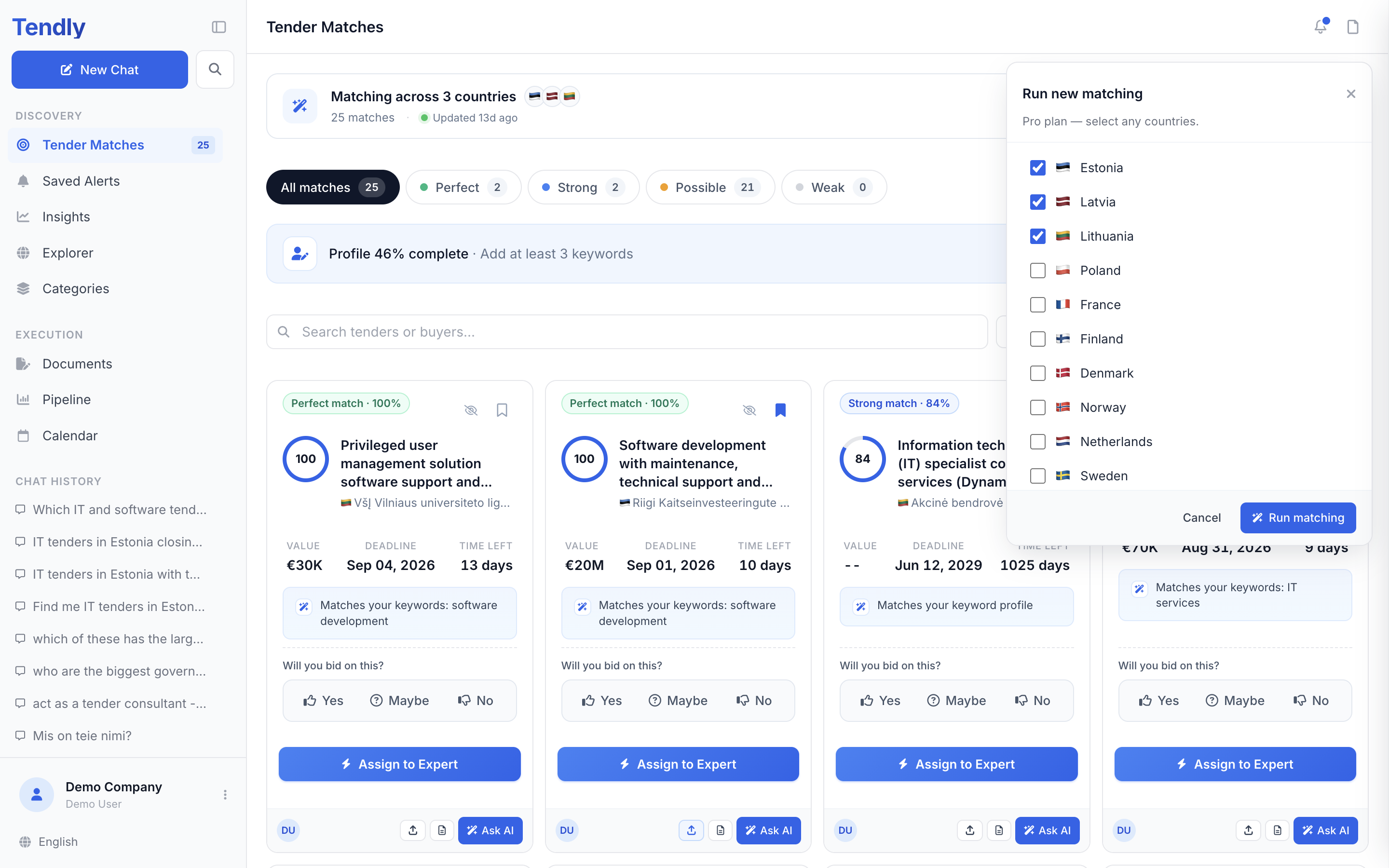
The moment onboarding finishes, Tendly kicks off your first run. Open "Tender Matches" under "Discovery" in the left sidebar: while it works, the card at the top reads "Running new matching" with the hint "Scanning fresh tenders — this usually takes under a minute". When it is done, the card names how many countries you are matching across and shows your flags, the match count and "Updated just now".
Running it again
- Open "Tender Matches" in the left sidebar.
- Click "Change scope or re-run" on the scope card — clicking the row of country flags opens the same thing.
- In the "Run new matching" popover, pick your countries. All 28 markets Tendly covers are listed.
- Click "Run matching".
Whenever a run finishes with at least one match — the automatic first run after onboarding included — Tendly emails you "Your tender matches are ready". To read the results, see Understanding your matches.
What a run costs
- On a Free plan the popover shows radio buttons and reads "Free plan — select one country." Each run that completes costs 5 credits, and a run that fails is never charged. New accounts start with 20 welcome credits.
- On a paid plan the popover shows checkboxes and reads "Pro plan — select any countries." Runs come out of your plan and cost no credits.
To lift the one-country limit, use the "Upgrade to Pro to pick multiple countries" link at the bottom of the popover, or see our pricing page.
You need CPV codes or keywords first
Matching reads two fields from your company profile: "CPV Categories" and "Keywords". If both are empty the run is refused and the page shows "Complete your profile to start matching". Click "Complete your profile", or open the profile button at the bottom of the sidebar and choose "Company profile", fill both in, then click "Save Company Profile".
In "Keywords", separate terms with commas and prefix a term with a minus sign to exclude it, for example -construction. Excluded terms alone will not start a run — you need at least one positive keyword or one CPV code.
How a tender gets picked
Tendly narrows open tenders to those whose CPV code starts with one of your CPV categories, then looks for your keywords in the tender title, the description and the CPV category name. A tender that only clears the CPV filter starts at 60 points; keyword hits add points on top — most for the title, least for the category name — up to 100. No language model reads the tender documents at this stage, so read the score as a relevance filter, not a bid recommendation. One run writes at most 500 tenders to your list.
The daily refresh
You do not have to re-run matching to stay current. From Tuesday to Saturday, Tendly adds the tenders scraped in the last day that fit the same profile and countries to your list. Your bid decisions and pipeline entries survive, and this pass costs no credits and sends no email.
Re-run manually when something changes — new CPV codes, new keywords, a new country. After you save your company profile, an amber strip appears on the scope card: "You changed your company settings — re-run your matching".
Matches belong to the account, not one person — everyone on your team sees the same list and the same decisions.