
Change your personal details, language, currency, password and notification preferences on one page.
Open your settings
- Click your name and company at the bottom of the left sidebar to open the profile menu.
- Click "Settings".
The page carries a tab strip — "Company profile", "Settings", "Knowledge Base", "Team", "Subscription", "TaaS" — and opens on your personal settings. Company details such as CPV codes, keywords and the countries you serve live on the "Company profile" tab instead.
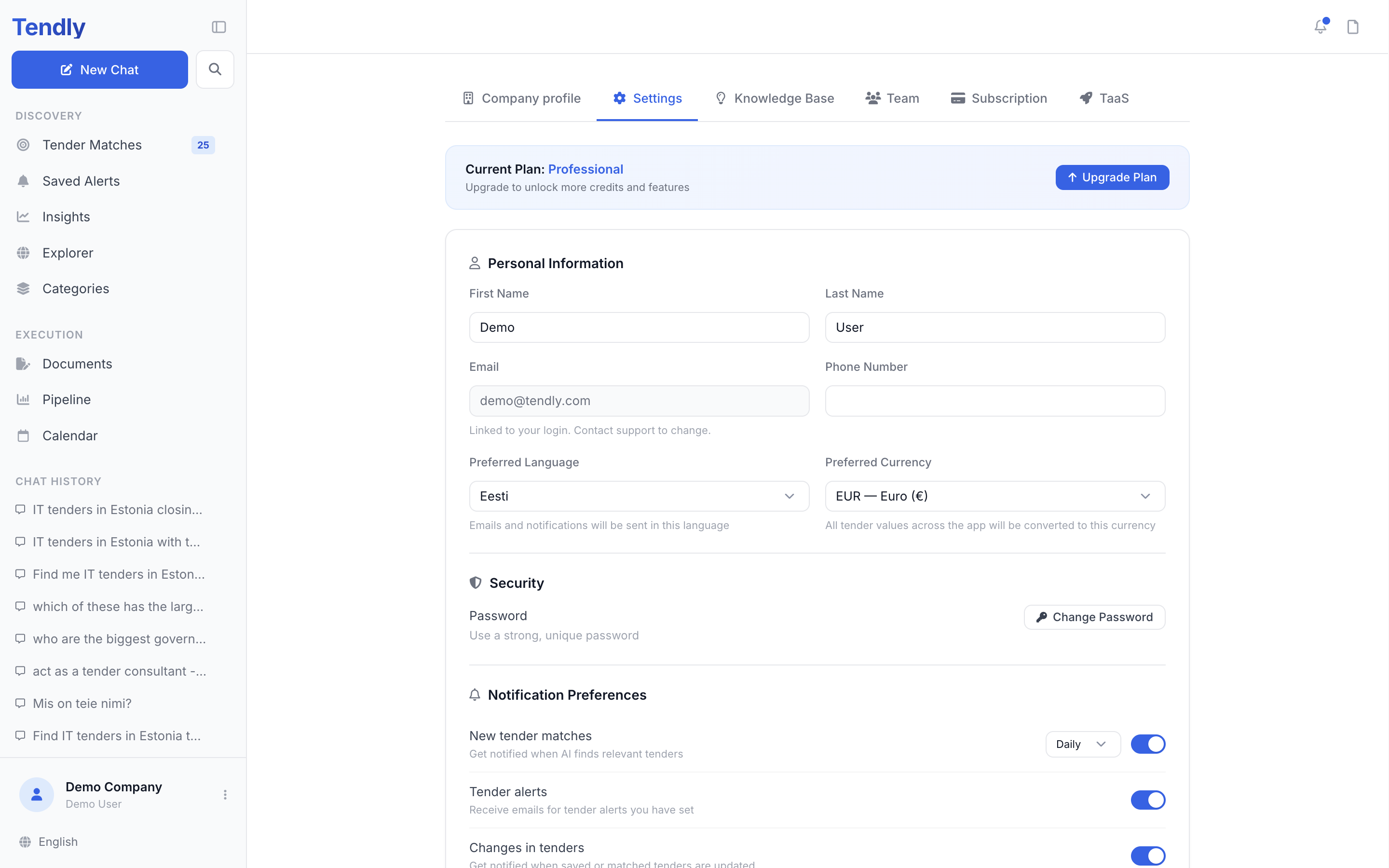
Personal information
Under "Personal Information" you can edit First Name, Last Name and Phone Number. Email is read-only: it is the address you log in with, and the field says "Linked to your login. Contact support to change."
Two fields do more than they look:
- "Preferred Language" — sets the language of the interface and of the emails and notifications Tendly sends you. Saving reloads the page in the new language. The globe button at the bottom of the sidebar only switches the interface language in this browser — set "Preferred Language" here if you also want your emails in that language.
- "Preferred Currency" — every tender value in the app is converted to this currency, so contracts from different markets can be compared side by side.
Click "Save Changes" at the bottom of the page to store all of it.
Your password
Under "Security", click "Change Password", then enter your current password and the new one twice. The new password must be at least 8 characters and different from the old one. If you created your account with "Continue with Google" there is no Tendly password to change — keep signing in through Google.
What Tendly sends you
"Notification Preferences" has seven switches, all on by default:
- "New tender matches" — when matching finds relevant tenders. The "Daily" / "Weekly" dropdown beside it is remembered in this browser only — it does not yet change how often the digest is sent. Ask support if you need a different cadence.
- "Tender alerts" — the bell entries for the alerts you saved; the alert emails themselves keep arriving while any of the six email switches is on.
- "Changes in tenders" — when a saved or matched tender is updated.
- "Deadline reminders" — before a submission deadline.
- "Team activity" — when a teammate tags you or updates a shared tender.
- "Product updates" — new features and announcements.
- "In-app notifications" — the master switch for the bell in the header. Off means no badges anywhere in the app.
Individually, each of the six switches controls that kind of notification in the bell. On the email side only the combination counts: while at least one of the six is on Tendly keeps emailing you, and turning all six off is what stops the match digests. Saved-alert emails and account emails such as password resets still arrive. "In-app notifications" only controls the bell — it never stops email.
Switches are saved by the same "Save Changes" button, so click it before you leave.
Deleting your account
At the bottom of the page, "Danger Zone" holds "Delete Account". You have to type "delete" to confirm. Your data, documents, team memberships and subscription are removed permanently and cannot be restored; invoices and payment records are kept for as long as tax and accounting law requires.